Canva Just Put a Design Team in Your Pocket. Here's Why the Book on My Desk Still Matters
Six days ago, at an event in Los Angeles, Canva announced the biggest shift in its platform since 2013.
They called it Canva AI 2.0. It's being pitched as "the world's first foundation model built to understand the structure, hierarchy, and complexity of real-world design." Plain-language translation: an AI that was trained specifically on how design works, not just on how words and images look.
Here's the stat that stopped me: according to a16z's analysis, Canva is now the third most-used generative AI product on the internet. Ahead of DeepSeek. Behind only Google Gemini. Which means the tool that 90% of small business owners were already using to make their social posts, flyers, and decks just quietly became one of the most powerful AI platforms in the world.
If you run a small business, this is genuinely good news. And it's also the perfect moment to talk about a thing Canva AI 2.0 still can't do for you.
WHAT JUST HAPPENED AT CANVA CREATE
The part that's worth the hype
The headline features of Canva AI 2.0 matter, so let me list the ones that actually move the needle for a small business:
Conversational agentic design. You describe what you want in plain English and Canva iterates with you. You can say "make the headline stronger, warmer, less corporate" and the layout adjusts. No clicking through eight menus.
Brand intelligence that learns you. Upload your logo, colors, tone, and past assets. The system holds that brand context across every future project. Your flyer next Tuesday will look like it came from the same brand as your Instagram carousel last month.
Layered, editable output from a single prompt. This is the big one. Previously, AI-generated design came out as a flat image you couldn't really edit. Now it comes out with real layers — text boxes you can rewrite, objects you can move, elements you can swap. It's a working draft, not a screenshot.
Connectors, web research, and a sheets-to-design pipeline. Pull data from a spreadsheet into a design automatically. Research a topic and draft visuals from the findings. The friction between "I have an idea" and "I have a deliverable" keeps shrinking.
For a one-person business, the practical effect of all this is that you now have a design capability that used to require a junior designer on retainer. That's not hype. That's the new floor.
THE PART I'M EXCITED ABOUT
This is what leveling the playing field looks like
For most of the last twenty years, the gap between a small business's brand presence and a Fortune 500 company's brand presence came down to access — access to designers, to brand strategists, to a creative team that could turn ideas into polished assets.
That gap is closing faster than anyone predicted. A coffee shop owner in Dallas can now produce a campaign that looks indistinguishable from something a Starbucks regional team would ship. A home services company can have brand-consistent social posts, door hangers, truck wraps, and landing pages without hiring a single designer.
This is the mission I started Pinch Hit Digital for. Small business is the backbone of the country. Tools like Canva AI 2.0 are why 2026 is genuinely the best year in modern history to run one.
And because the tool is now this good, this is the moment to talk about the thing underneath it.
WHY I HAVE A 300-PAGE BOOK OPEN ON MY DESK
The part the AI can't do for you
On my desk right now is a book called 100 Things Every Designer Needs to Know About People by Susan M. Weinschenk. Second edition. I bought it because I'm not a trained designer. I came up in journalism and enterprise tech. Learning how design actually affects human behavior has been one of the most useful things I've done this year.
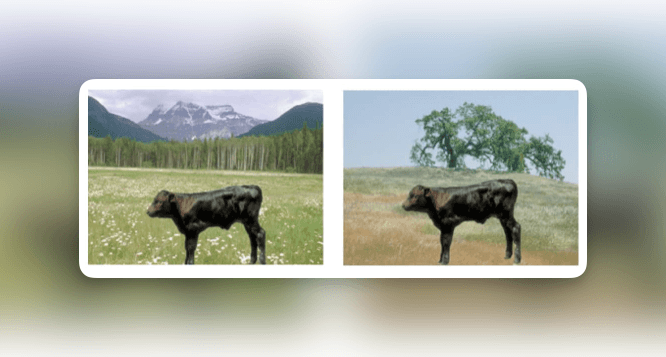
Chapter 39 is called "Culture Affects How People Think." It includes a figure I can't stop thinking about.
It's two photographs of the same black calf. In the first, the calf is standing in an alpine meadow with snow-capped mountains in the background. In the second, the same calf is standing in a grassy field with a single large tree. Figure 39.1. Used in Hannah Chua's 2005 research.
Weinschenk asks: "What do you notice more, the cows or the background?"
Here's the part that made me put the book down.
Research summarized in Richard Nisbett's book The Geography of Thought found that the answer depends on where you grew up. People raised in the West — U.S., U.K., Europe — overwhelmingly focus on the foreground object. The calf. The main thing. People raised in East Asia pay much more attention to the context and background. The landscape. The relationships between the objects.
Same photograph. Completely different perception. Not because one group is smarter than the other. Because of culture.
Now imagine you run a small business serving a specific customer base. Maybe it's second-generation Vietnamese families in Garland. Maybe it's retired Boomer couples in Plano. Maybe it's twenty-something tech workers in Deep Ellum. The way those audiences look at an image, read a layout, process a call-to-action — it isn't the same. At all.
Canva AI 2.0 can generate you ten beautiful versions of a flyer in forty seconds. What it can't tell you is which one your specific customer will actually see.
THE UNFAIR ADVANTAGE IN 2026
Output is free. Taste is the moat.
Here is what I think is about to happen in small business design.
When the tool is free and the output is infinite, the advantage stops being can you make something. The advantage becomes do you know which thing to make.
The businesses that win with Canva AI 2.0 aren't going to be the ones who generate the most assets. They're going to be the ones who actually know their customer. Who have sat with a real person across a table and asked, "When you see our Instagram, what do you notice first?" Who read books like Weinschenk's, or The Geography of Thought, or anything that helps them understand how the human brain processes what they just built.
That's the workflow I'm using and recommending to clients:
Know who this is for. Specific person, not a persona. Name them.
Know what they're likely to notice first. Foreground? Background? Words? Faces?
Then let Canva cook. Generate ten versions. Iterate with the agentic editor.
Pick based on step 1 and 2, not based on what looks nice to you.
The tool is an amplifier. It can't give you the thing to amplify. That part is still on you and that's actually the best possible news, because it means a small business owner who really knows her customer can now beat a big brand that doesn't.
TRY THIS THIS WEEK
Here is what I'd do if I were sitting where you are right now.
Open Canva. Try AI 2.0 if you have Pro or the research preview. Generate three versions of your next social post. Instead of picking the one you like best, send all three to one actual customer and ask which one catches their eye first — and why. That five-minute exercise will teach you more about your own brand than a year of guessing.
You don't need to be behind on this. The tool just got here. Most of your competition is still going to throw things at the wall and hope. You get to do it on purpose.
If you want help thinking through what your brand actually needs to say — or how to use Canva AI 2.0 in a workflow that fits your business — that's the conversation I have every week. Let's talk.